
Idle fees help ensure charging stations remain available for other drivers once a vehicle has finished charging. This guide explains how idle fees work, when they apply, and how to configure them correctly in the Epic Charging dashboard.
What Are Idle Fees?
An idle fee is a charge applied when a vehicle remains plugged into the charger after charging has completed.
The goal of idle fees is to encourage drivers to move their vehicles once charging is finished, allowing other drivers to use the station.
Idle fees are not triggered by the total session time or by the maximum session limit. They are triggered only when the vehicle has finished charging and remains connected to the charger.
When Do Idle Fees Start?
Idle fees begin only after the vehicle stops charging and a grace period has passed. Grace period - number of minutes after the session ends during which no idle fee is charged.
The typical flow looks like this:
- Driver plugs in and starts charging.
- Vehicle charges normally.
- Vehicle reaches full charge or stops drawing power.
- Grace period begins.
- If the vehicle remains plugged in after the grace period, idle fees begin.
Example:
- Charging completes at 3:00 PM
- Grace period is 10 minutes
- Idle fees start at 3:10 PM
How Idle Fees are Calculated
Idle fees are based on the hourly idle fee rate, but they are charged proportionally to the actual time the vehicle remains plugged in after the grace period ends.
For example, if the idle fee is set to $10/hour, the system converts that rate into a per-minute charge and applies it only to the minutes beyond the grace period.
How to Enable Idle Fees
Idle fees must be enabled within the pricing rate configuration.
To activate idle fees:
1. Start by navigating to the 'Locations' tab within your Epic account.
2. Open the 'Pricing' tab within the Location you want to configure and edit the rate you would like to apply (you can follow this guide to configure pricing).

3. You can use the interval controls (Idle fee ON/OFF per pricing time block) to enable or disable idle fees for different hours of the day. Ensure the Idle fee is toggled ON for the time intervals when idle fees should apply.

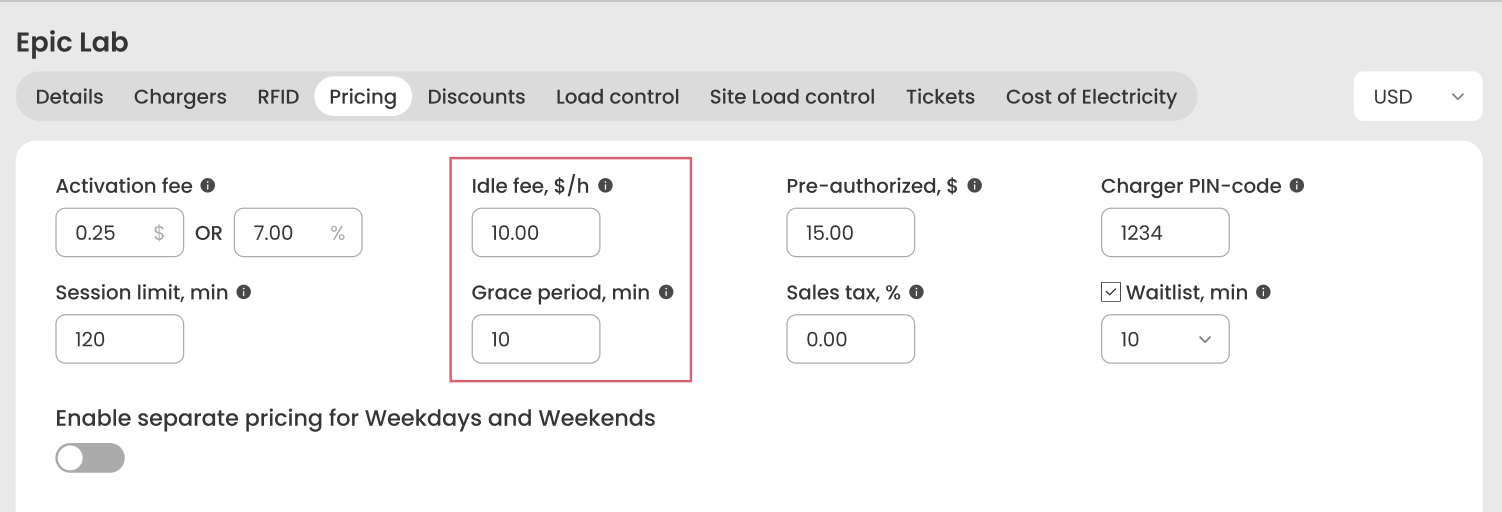
4. Configure:
- Idle fee amount (for example, $10/hour)
- Grace period (for example, 10 minutes)
Idle fees can be used with both:
- Energy-based pricing ($/kWh)
- Time-based pricing ($/hour)
Driver Notifications
To help drivers avoid unexpected charges, Epic Charging automatically notifies them when idle fees are about to begin.
Drivers receive:
• Push notification in the Epic mobile app
• Email notification
These notifications inform the driver that charging has completed and that idle fees will begin after the grace period if the vehicle remains plugged in.

Example Use Cases
Example 1 — Standard Charging Session
Station price: $0.35 per kWh
Idle fee: $10/hour
Grace period: 10 minutes
- Driver begins charging at 1:00 PM
- Vehicle finishes charging at 2:30 PM
- Grace period runs from 2:30 PM to 2:40 PM
- Driver disconnects at 2:37 PM
Result: No idle fee is charged.
Example 2 — Idle Fee Applies
Station price: $0.35 per kWh
Idle fee: $10/hour
Grace period: 10 minutes
- Driver begins charging at 1:00 PM
- Vehicle finishes charging at 2:30 PM
- Grace period runs from 2:30 PM to 2:40 PM
- Driver leaves vehicle connected until 3:10 PM
Result:
Idle time billed = 30 minutes (from 2:40 PM to 3:10 PM)
Idle fee charged = $5.00
Example 3 — Vehicle Still Charging
Driver starts charging at 1:00 PM and the vehicle continues charging until 3:30 PM.
Even if the session has been active for several hours, idle fees will not apply while the vehicle is still actively charging.
Idle fees only start after charging stops.
Best Practices for Site Hosts
To avoid driver confusion and maximize charger availability:
• Set a reasonable grace period (5–15 minutes)
• Clearly communicate idle fees in signage or station descriptions
• Use idle fees at busy or high-demand locations
Idle fees are especially useful at:
- Multi-tenant residential buildings
- Workplace charging
- Public charging locations with limited parking
Need Help Configuring Idle Fees?
If you need assistance configuring idle fees or reviewing your pricing setup, our team is happy to help.
Contact Epic Charging Support: support@epiccharging.com